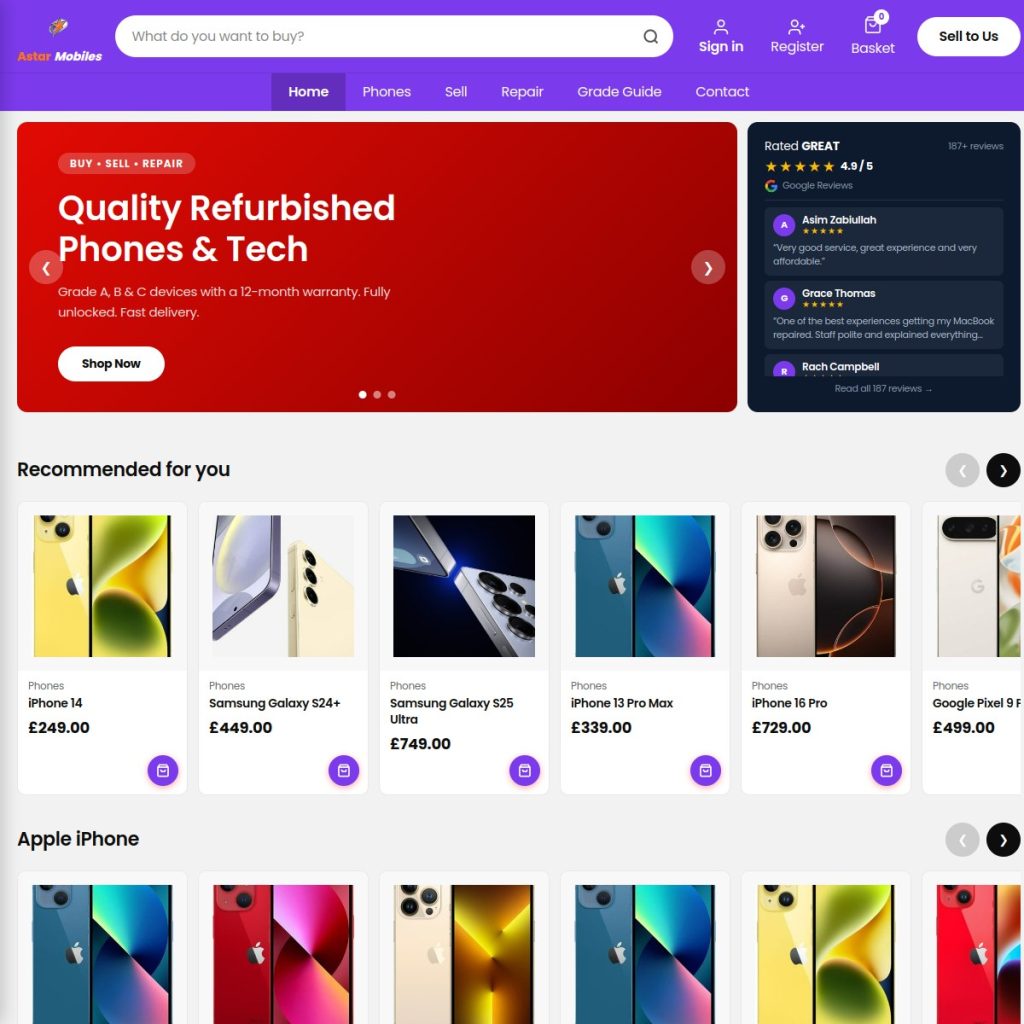
We built a CeX-style buy, sell and repair eCommerce platform for A Star Mobile in Bangor from a blank WordPress installation. No page builder. No pre-built theme. No WooCommerce extensions we did not absolutely need. Just clean, custom PHP and a clear brief. Here is how it came together and what the build taught us about doing eCommerce properly for a retail business.
The brief
A Star Mobile buys and sells refurbished phones, tablets and accessories, and offers repair services on the side. The client wanted something that worked like CeX — clear product grading, condition descriptions, buy and sell prices visible on the same product page, a fast browsing experience and a site that looked credible enough for customers to trust buying a second-hand device online.
The reference point of CeX was helpful because it gave us a clear model for the user experience. The challenge was that most WooCommerce themes and templates are built for new-product retail with single prices, standard variants and conventional checkout flows. A graded, second-hand electronics retailer has different requirements.
Why we built a custom theme rather than using a template
We looked at available WooCommerce themes for this type of business. The problems were consistent across all of them. They loaded slowly because of bloated stylesheets and unnecessary JavaScript. They did not support the product grading system we needed. They were built to look like generic online shops rather than a specific kind of specialist retailer. And they came with limitations we would spend the entire project working around rather than working with.
Building a custom theme from scratch costs more upfront. Over the lifetime of the site, it costs less — because there are no template licensing fees, no plugin conflicts to resolve, no performance compromises to work around and no design constraints imposed by someone else’s decisions.
The product grading system
CeX uses a grading system that tells customers exactly what condition a product is in — A for like new, B for good, C for acceptable, and so on. We built an equivalent system directly into WooCommerce using custom product attributes and a bespoke grade display component on every product page.
Each grade has its own colour, its own description and its own price. Customers can see at a glance what they are getting and why it costs what it costs. This transparency is one of the most important trust signals for second-hand retail — customers who feel informed buy with confidence. Customers who feel uncertain do not buy at all.
We stored the grade in custom post meta and displayed it through a custom single product template rather than through WooCommerce’s default variant system. This gave us complete control over the layout and behaviour — and meant we were not constrained by how WooCommerce thinks product variants should work.
80 product categories and why navigation matters more than search
A Star Mobile stocks across a wide range of devices — iPhones, Samsung Galaxy phones, Google Pixels, iPads, MacBooks, accessories. Within each device category there are multiple grades, storage sizes and colours. Organising this coherently requires careful taxonomy planning before a product is added to the site.
We built a category hierarchy of 80 WooCommerce categories structured to match how customers actually browse — by device brand first, then by model, then by specification. The navigation is persistent, clear and fast. Finding any specific product takes three clicks maximum from the homepage.
Most eCommerce sites over-invest in search functionality and under-invest in browse navigation. The reality is that most customers who know what they want will use navigation to find it. Search is for customers who do not know exactly what they want — and those customers need good navigation even more, because if they cannot find a category that makes sense to them, they leave.
The buy and sell price display
One of the features that makes CeX distinctive is showing both what they will sell a product for and what they will pay to buy it from customers. We replicated this on product pages using a custom WooCommerce metabox that stores the sell price separately from the standard WooCommerce price.
The sell price displays on the product page alongside the standard buy price — framed clearly so customers understand what each figure means. This feature is simple in concept and required custom development to implement cleanly. It is exactly the kind of thing that is easy to build properly and awkward to achieve with plugins.
Trust signals for second-hand retail
Buying a refurbished device online requires more trust than buying a new one. Customers are making a decision based on a photograph and a description. The design decisions we made consistently aimed to reduce the uncertainty that causes hesitation and abandonment.
Every product page includes the grade with its full description. Photographs are required for each listing. The return policy is stated clearly on product pages rather than buried in terms and conditions. Google Reviews are displayed site-wide using a custom API integration that pulls live review data rather than a screenshot. Contact details and the physical shop address are visible on every page.
None of these are complicated. All of them are necessary. Trust is built through dozens of small signals rather than one big statement.
Performance on a WooCommerce site
WooCommerce sites have a reputation for being slow. In most cases the slowness comes not from WooCommerce itself but from the bloated themes and add-on plugins that surround it. A lean WooCommerce installation with a custom theme, minimal plugins and proper caching performs well.
The A Star Mobile site loads in under two seconds on a standard mobile connection. The product category pages are fast despite the number of products because the queries are optimised and the output is cached correctly. Google PageSpeed scores are in the mid-to-high 80s on mobile — acceptable for a WooCommerce catalogue of this size and meaningfully better than most comparable sites.
What this build taught us
Custom eCommerce is not about building complexity. It is about removing the compromises that pre-built themes and generic plugins force on you. When you build to the brief rather than building around a template, every decision serves the business rather than the template. The result is a site that does exactly what the business needs, performs better, and is easier to maintain and extend over time.
If you run a retail business that needs a proper eCommerce platform rather than a template online shop, see how we approach eCommerce development or get in touch to discuss your project.
Frequently asked questions
Is WooCommerce good enough for a serious eCommerce business?
Yes — with the right implementation. WooCommerce powers some very large online retailers. The platform scales well when built correctly. The problems that give WooCommerce a bad reputation for performance and reliability almost always come from poor theme choices and plugin overload, not from WooCommerce itself.
How long did this project take?
From briefing to launch, the A Star Mobile build took approximately eight weeks. This included custom theme development, WooCommerce configuration, product taxonomy setup, custom grade system implementation and all the trust signal integrations.
What makes a second-hand retail site different to build?
Condition grading, buy and sell price display, high-trust design requirements, and the need for extremely clear product information are all specific to this type of retail. Standard WooCommerce themes are designed for new-product retail and require significant customisation to serve second-hand retail well.
Can WooCommerce handle a large product catalogue?
Yes. WooCommerce scales to tens of thousands of products with proper hosting and database optimisation. Category pages and product queries need to be optimised as the catalogue grows, but this is routine WordPress development work rather than a platform limitation.